I have worked with a lot of clients across different organizations and teams. As you move into more senior roles, the amount of information you need to keep track of changes dramatically. It is no longer just about your own tasks. You have to remember what you are working on, what you have delegated, what your team members are working on, what decisions were made in previous meetings, what experiments were tried, what worked, what failed, and what you learned from them.
I have used task-management tools like Asana and ClickUp, and they are very good at managing tasks. But tasks are only one part of the problem. There is another layer that I have always struggled with: knowledge.
The problem with accumulating knowledge
I learn something almost every day.
A meeting creates new context. A client conversation creates an observation. An SEO experiment creates a lesson. A failed process creates a new understanding. A random thought might eventually become a useful idea.
The problem isn’t collecting these things. The problem is being able to find and use them later.
You can build a knowledge base in something like Notion. You can create databases, tags, relationships and dashboards. But I always felt that I wanted something more portable. If I changed tools, I didn’t want my knowledge to become trapped inside that tool.
I wanted the underlying information to remain mine and to be usable somewhere else.
That eventually led me to Obsidian.
Why Obsidian worked for me
I discovered Obsidian around three years ago. Me and my fellow SEO team members were looking for a better way to centralize the enormous amount of information we were dealing with.
We had tasks to manage, clients to understand, meetings to document, strategies to develop and experiments to track. More importantly, we often had to recall information very quickly.
In leadership meetings, there were times when we had less than three seconds to find a number or explain what had happened. Having all of that information organized and accessible made a real difference.
Obsidian worked surprisingly well for this.
It isn’t revolutionary software. In fact, that is probably one of the reasons I like it. At its core, it is a collection of Markdown files.
The files are yours. You can open them outside Obsidian. You can back them up. You can move them. You can connect them. You can build your own system around them.
At the time, we used Google Drive for backup. There are many other ways to synchronize or version-control Markdown files now, but the important part for me was that the underlying knowledge wasn’t locked inside a proprietary database.
And Markdown was particularly useful because it was simple and portable.
My Obsidian is deliberately boring
There are some incredible Obsidian setups online. People build elaborate dashboards, automated workflows, beautiful visualizations and incredibly complicated vaults.
Mine is much simpler.
I have folders for things such as projects, meetings, ideas in progress, automations, learnings, skills and clients.
If I start working on a new project, I create a folder for it and document what I need to know. That might include what the project is, what it does, its goals, its features, its market, its pricing, its marketing strategy and my observations about it.
I have a separate meetings folder as well. Inside it, I organize meetings around things such as content strategy, SEO strategy, clients, automation, annual planning, algorithm updates, backlink strategy, client escalations and other topics.
The exact folder structure isn’t the important part.
The important part is that everything can be connected.
My index file is the center of the system
I have a main index file that acts almost like the home screen for my knowledge base.
It contains a table of contents with links to important files and sections. I also keep track of things such as my goals, current meetings, observations, challenges, clients, priorities and other notes that I frequently need to access.
I also maintain a separate note called tomorrows-task.md.
Before logging out for the day, I update it with the tasks I expect to work on the next day. Those tasks are then displayed dynamically in my main index file.
So when I start work, I don’t have to reconstruct my context from scratch.
I can open one file and get a quick overview of what I need to know:
What am I doing? What have I been thinking about? What happened recently? What do I need to do next?
The individual notes are interconnected as well. A meeting can link to the previous meeting, which can link to a project, which can link to an experiment, which can link to the decision that came out of that experiment.
Over time, this became more than a note-taking system.
It became a working memory for my professional life.
And then AI changed the problem
Today, I also use Obsidian as my personal knowledge base.
I use it for work, but also for things outside work. I keep track of expenses, documents, personal observations, things I learn and other information that I want to retain.
The entire ArmanMathur.com website is also built around this idea. The notes I create in my personal knowledge system can eventually become things I publish on the website.
So the website is, in a way, a public layer on top of my private thinking system.
But AI introduced a new question:
What if I could make all of this knowledge usable by an LLM?
That sounded simple.
It wasn’t.
The obvious solution doesn’t scale
The obvious solution is to give Claude my entire Obsidian vault.
If I have 100 files, maybe that works.
But what happens when I have 1,000 files? Or 5,000?
You can’t continuously dump your entire knowledge base into every conversation. It would consume context and resources, and most of the information wouldn’t even be relevant to the question being asked.
The real problem isn’t:
How do I give AI all my knowledge?
It is:
How do I give AI the right knowledge at the right time?
That is a much more interesting problem.
Discovering Open Knowledge Format
Recently, Marie Haynes shared some thoughts with the SEO community about Google’s Open Knowledge Format (OKF) and published a detailed post explaining how she was experimenting with it.
That caught my attention because I was already thinking about a similar problem: how could I make my Obsidian knowledge base usable by an LLM without feeding the entire vault into every conversation?
I became interested in the idea.
I still don’t fully understand all of the technicalities behind OKF, but the basic concept made sense to me. Instead of treating a knowledge base as one giant collection of information, you can structure knowledge into portable files with context and relationships that can be understood by both humans and AI systems.
I started experimenting with the idea and gave Claude Code instructions about what I wanted to achieve with my existing Obsidian database.
With some modifications and help from Claude, I created an OKF-style layer around my Obsidian knowledge base.
I wasn’t trying to build some perfect enterprise knowledge architecture.
I was trying to solve a very practical problem:
How can I make my existing knowledge usable by an AI without constantly feeding the AI my entire vault?
My Obsidian vault became the source of truth
The important distinction is that I didn’t replace Obsidian.
Obsidian is still where my knowledge lives.
The additional context layer is there to help Claude understand and navigate that knowledge.
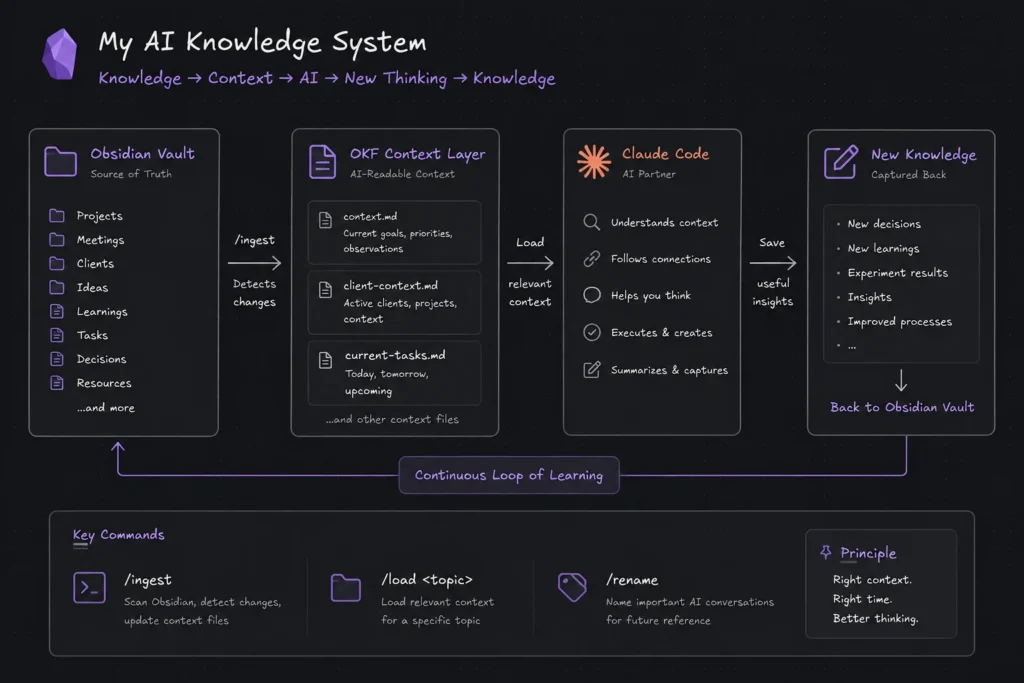
I currently have a few different context files, including:
context.mdclient-context.mdcurrent-tasks.md
These files don’t contain every piece of information I have.
Instead, they contain the information Claude needs to understand what is currently important.
Think of them as a compressed map of my larger knowledge base.
For example, context.md keeps track of recent meetings, recent notes and context that I need Claude to retain. client-context.md contains relevant information about current clients and projects. current-tasks.md contains the work that is currently active.
The idea is to keep a relatively small amount of high-value context while allowing Claude to follow links back to the underlying Markdown files when it needs more information.
How Claude uses the context
Suppose I want to continue working on a content strategy that we discussed previously.
Instead of explaining the entire history again, I can ask Claude Code to load the relevant context around that topic.
It can look at the context file, identify the relevant previous meetings and follow the links to the underlying Markdown notes.
Conceptually, it might look something like this:
context.md
→ content-strategy-meeting.md
→ client-observations.md
→ seo-experiment.md
→ decision.md
Claude isn’t simply receiving a random collection of documents.
It is navigating a connected knowledge system.
That distinction is important.
The /ingest command
This is probably the part of the system I find most useful.
I don’t want Claude to crawl my entire Obsidian vault every time I start a session.
If I have hundreds or thousands of files, continuously processing everything would be inefficient and unnecessary.
So I created a command called:
/ingest
When I run it, Claude goes through my index and looks for what has changed.
That might include new meetings, new tasks, new notes, new decisions, new observations or changes in priorities.
It then updates the relevant context files.
So instead of telling Claude:
Here are all of my files. Read everything.
The process becomes:
Here is what has changed. Update the context that matters.
I currently run the command roughly once a day or every other day.
The goal is simple:
Don’t let Claude work from stale context.
Naming important AI conversations
I’ve also started treating important AI conversations as part of the knowledge system.
Sometimes I have a Claude Code thread where a lot of useful thinking has happened. If I know I might want to reference that conversation later, I rename it using a /rename command.
This gives the conversation a meaningful name that I can refer to later.
It is another small part of the system, but I like these small pieces because they don’t require much effort.
A knowledge-management system only works if maintaining it is easier than not maintaining it.
What happens when the AI context gets too large?
There is another problem.
Sometimes a Claude Code conversation becomes very long. Eventually, the context starts approaching its limit and Claude may need to compact the conversation.
If the conversation contains important reasoning, I don’t want to lose that context.
So when I feel that a thread is becoming important, I ask Claude to save the useful context back into the knowledge structure.
In other words:
The conversation can feed the knowledge base.
This creates a loop:
Knowledge → AI → new thinking → knowledge
And that is probably the most interesting part of the entire experiment.
The knowledge base isn’t just something I give to AI.
The AI can also help create new knowledge that goes back into the system.
The system I’m currently using
At a high level, the system looks something like this:
Obsidian → Context Layer → Claude Code → New Knowledge → Obsidian
Obsidian remains the source of truth.
The context layer provides Claude with the information it needs right now.
Claude Code uses that context to help me work, think, analyze and execute tasks.
The useful output can then be captured back into the knowledge base.
So the system becomes a continuous loop rather than a one-way process.
I still have a problem
The system isn’t perfect.
In fact, one of my biggest problems right now is almost the opposite of what I initially expected.
If I keep ingesting new information, the context files themselves can become larger and larger.
At some point, I have to clean them.
For now, one approach I’ve tried is opening the OKF context files in a separate Obsidian vault and reviewing them periodically.
Once a month, I can go through the context and remove outdated tasks, stale information and things that no longer need to be retained.
But I suspect there is a better way.
Maybe context should expire automatically.
Maybe different types of knowledge should have different lifetimes.
A task might only matter for a few days.
A project decision might matter for a year.
A lesson learned might remain useful for decades.
Maybe the system should understand the difference between:
What happened yesterday
and
What I learned three years ago that still matters.
I haven’t solved that yet.
The bigger lesson
This experiment has made me think about personal knowledge management differently.
The limiting factor with AI isn’t always what the model can do.
Sometimes the limiting factor is the quality of the context we give it.
And even that isn’t the whole problem.
You can have thousands of excellent notes. You can have an interconnected knowledge graph. You can have an AI agent that can search all of it.
But if you don’t know what you’re trying to achieve, none of that matters.
This is something I keep coming back to:
AI doesn’t replace the need for thinking.
It makes clear how important thinking is.
Before asking an LLM to solve something, I need to know what I’m trying to achieve, what the final result should look like, what information matters, what constraints exist, what decisions have already been made and what “good” looks like.
The LLM can help execute the process.
But I still need the logic.
I still need the vision.
I still need the judgment.
Without those, a very sophisticated knowledge base can become little more than a very sophisticated pile of notes.
Where I want to take this next
I’m still experimenting with this.
I don’t consider the current setup a finished system.
Right now, my setup is roughly:
Obsidian → Markdown → OKF-style context layer → Claude Code
The interesting thing is that none of these components has to be permanent.
My notes are Markdown.
The knowledge format is open.
The AI model can change.
The tools can change.
The underlying knowledge remains mine.
That is probably the biggest reason I like this approach.
I’m not sure this is the best way to build a personal AI knowledge system. There are probably much better architectures, and I suspect other people are already solving some of these problems in ways I haven’t considered.
The questions I’m most interested in now are around context decay, retrieval, prioritization and memory.
How should an AI decide what is important enough to remember?
How should old context disappear without losing useful knowledge?
And how can a personal knowledge base become something more than a searchable archive?
The question I’m left with
I don’t think the interesting question is whether we can connect an LLM to our notes.
We obviously can.
The more interesting question is what happens when the knowledge we have accumulated over years becomes continuously available to the tools we use to think and work.
That could be particularly interesting for knowledge workers.
An SEO professional might accumulate years of observations about search, clients, experiments, websites and processes.
A researcher might accumulate years of papers, hypotheses and observations.
A product manager might accumulate decisions, customer conversations and product insights.
The knowledge already exists.
The challenge is making it usable.
So that’s the question I’m left with:
How are other people organizing their personal or professional knowledge so that AI can actually use it?
Not just as a searchable archive.
Not just as RAG.
But as a living knowledge system that helps you think, work and make better decisions.
If you’re doing something similar—especially in SEO, marketing, research or other knowledge-work roles—I would genuinely like to know how you’re approaching it.